Showing posts with label VBN. Show all posts

Monday, May 3, 2021

SEPparser Released

What is SEPparser?

SEPparser is a command line tool examine artifacts from Symantec Endpoint Protection (SEP). SEPparser can be ran against a single file, directory, dead box system (write-blocked hard drive of mounted collection), or for live response.


Capabilities

  • Parse settings for log files
  • Parse the following log files:
    • Security log
    • System log
    • Firewall Traffic log
    • Firewall Packet log
    • Application and Device Control log
    • AV Management plugin log
    • Daily AV logs
  • Extract packets from Firewall Packet log
  • Parse ccSubSDK database into csv reports
  • Extract potential binary blobs from ccSubSDK
  • Parse VBN files into csv reports
  • Extract quarantine data to file or hex dump
  • Preform hex dump of VBN for research

Using SEPparser

SEPparser can be ran on Windows or Linux. Running SEPparser by itself shows all the available options.


There are quite a few options, but it is straight forward to use.


Basic usage

To run SEPparser, all you need to do is point it to a file (-f) or a directory (-d) and SEPparser will take care of the rest. Output will be stored in the current directory SEPparser is ran from. This can be changed using OUTPUT (-o) option.


But what if we don't know the location of the Symantec files? The -d option can be used at the base directory and all files will be scanned from that path recursively. To speed up the process, or if we are using a script, we can use KAPE mode (-k) in conjunction with -d. What this does is SEPparser will only scan files in locations where SEP data is stored instead of every file.

If we want to append data to output files that SEPparser already created, the append (-a) option can be used.

Once SEPparser is finished a series of csv files will be created.


Time Zones

Some of the time stamps in SEP's data are in UTC and others are recorded in the time zone set on the device they came from. There are a couple of ways to get all the time stamps to be in UTC.  

  1. If the registrationInfo.xml file is found during the scan; the offset will be automatically applied.
  2. The -r option can be used to point to the location of the registrationInfo.xml file so the offset can be automatically applied.
  3. The -tz option can be used to manually enter a time zone offset.


Logging

SEPparser has a logging feature (-l) that can be used to save the console output to a log file. This can be useful to check for errors during parsing. If an error occurred, the -v option can be used to get a more verbose output of what went wrong.


Quarantine Files (VBN)

When it comes to quarantine files, SEPparser has some additional features that can be useful.  

SEPparser has the ability to extract (-e) the quarantined data or it can dump the data to the console in hex format with the -qd option.


SEPparser can also produce a hex dump of the VBN itself. While SEPparser does a rather excellent job of parsing VBN's into the csv report, there is still data that it cannot. There are some parts of the VBN format that are unknown. The hex dump can help researchers to understand and figure out what these unknown parts of the file format mean.


SEPparser also contains hash-file (-hf) option. This can be used when parsing VBN files for reports. Because there can be extra data in the VBN file, the hash reported is not always the hash of the actual file. With the -hf option, SEPparser will record the MD5, SHA1, and SHA256 of the actual quarantined data.


ccSubSDK Database

SEPparser has an extract-blob (-eb) option that can be used when parsing the ccSubSDK database. With this option enabled, SEPparser will extract anything that could be an executable contained in the ccSubSDK database.


Packets

SEPparser has one more trick up its sleeve. When parsing the raw.log (packet log), SEPparser will extract the packets from the log into a text file. This text file can then be loaded into a tool, like Wireshark, to examine the packets. SEP only captures the headers and not the data associated with it.




There is a public GitHub repository, located at https://github.com/Beercow/SEPparser, containing SEPparser and a wiki with the file formats for the SEP artifacts. KAPE also includes targets and modules for Symantec Endpoint Protection and SEPparser. If you find any errors or would like to contribute, issues/pull requests are always welcome. 

Tuesday, March 16, 2021

Your AV is Trying to Tell You Something: VBN's Part 4

In this post, we will cover record type 1 VBN's. This will be fairly short because there is not much to these types of VBN's. They contain one structure that is not XORed after the VBN Metadata. This is the Quarantine Metadata structure. It contains the same kind of data as in record type 2's Quarantine Metadata, minus the header information.


new 1

Record Type 1

Quarantine Metadata

The quarantine metadata appears to be in ASN.1 format. It is comprised of a series of tags.

Code Value Length Extra Data
0x01 1 None
0x0A 1 None
0x03 4 None
0x06 4 None
0x04 8 None
0x07 4 NUL-terminated ASCII String (of length controlled by dword following 0x07 code)
0x08 4 NUL-terminated Unicode String (of length controlled by dword following 0x08 code)
0x09 4 Container (of length controlled by dword following 0x09 code)
0x0F 16 None
0x10 16 None

Tuesday, March 9, 2021

Your AV is Trying to Tell You Something: VBN's Part 3

This post will focus on record type 0 VBN's. Record type 0 VBN's also contain quarantine data. I recently discovered these files which lead to figuring out how to tell the different VBN files apart. I am unsure of what causes the different record types. Record type 0 starts out like any other VBN with the VBN Metadata structure. After that, they contain their own unique structures as follows:

  • QData Location (XORed with 0x5A) *Optional
  • Quarantine Data (XORed with 0x5A)
  • QData Info (XORed with 0x5A) *Optional
As before, if we grab the first four bytes of the VBN Metadata, it will bring us to the next structure. If the structure starts with 0xCE20AAAA06000000, The QData Location structure is present.

QData Location

The QData Location structure contains the offset to the quarantine data, size of the structure, the size of the QData Info structure and some unknown data that has always been all 0's, in my case.


If we add together the the first four bytes of the VBN Metadata and the Quarantine Data Offset, this will bring us to the Quarantine Data. (Unless QData Location is not present, we would already be there)

Quarantine Data

Unlike with record type 2 VBN's, the quarantine data is not divided into chunks. The data will be stored as it was on disk. Making it much easier to extract the data.

QData Info

QData Info will be present if the QData Location structure is also present. QData Info contains data which appears to be in ASN.1 format but I have had a harder time parsing it out into individual sections.


new 1

Record Type 0

QData Location (Optional)

Offset Length Field Description
0 8 Header QData location header, 00000006aaaa20ce
8 8 Quarantine Data Offset Offset to start of quarantine data
16 8 QData Location Size Size of QData Location
24 4 QData Info Size Size of QData Info from end of quarantine data to EOF
28 Data Offset - 28 Unknown Will require further investigation as to the purpose of this entry.

Quarantine Data

Offset Length Field Description
0 Varies Data Quarantine data

QData Info (Optional)

Offset Length Field Description
0 8 Header QData info header
8 8 QData Info Size Size of QData info
16 QData Info Size - 16 QData Additional information about the quarantine data

Tuesday, March 2, 2021

Your AV is Trying to Tell You Something: VBN's Part 2

From the previous post, we learned that there are three VBN record types. I want to start with record type 2 because this is what people think of when examining VBN's. Record type 2 VBN's consist of the following structures:

  • VBN Metadata
  • Quarantine Metadata (XORed with 0x5A)
  • Quarantine Hash (XORED with 0x5A)
  • Quarantine SDDL (XORed with 0x5A) *Optional
  • Unknown (XORed with 0xA5) *Optional
  • Quarantine Data (XORed with 0xA5) *Optional
  • Quarantine Attribute (XORed with 0xA5) *Optional
These VBN's contain quarantine files/data except if the malicious data was cleaned by deletion. Type 2 are by far, the hardest to extract data from. If we grab the first four bytes (Quarantine Metadata Header offset) from the VBN Metadata, this will bring us to the beginning of the Quarantine Metadata Header.


Quarantine Metadata

The Quarantine Metadata starts out with a header that contains the size of the Quarantine Metadata and the size from the end of the Quarantine Metadata to the end of the VBN. 


The Quarantine Metadata itself, appears to be in ASN.1 format. A series of tags are used to differentiate the size and type of data. 


If we add together the Quarantine Metadata Header offset (from the VBN Metadata) and the QM Size Header Size together, we find ourselves at the next structure. What structure comes next depends on the tag. If it is 0x03, the Quarantine Hash structure is present. If it is 0x06, there is an unknown structure that appears to be a continuation of the Quarantine Metadata.

0x03 Quarantine Hash

The Quarantine Hash structure can contain the SHA1 hash and size of the quarantine data. This is all depends on the value of the second tag. If the value is 0x00, the hash will not be present and the VBN will end here. If it is 0x01, the hash and the rest of the fields will be present. If all fields are present in this structure, the next tag will either be 0x08 or 0x09. If the tag is 0x08, the Quarantine SDDL structure is present.

No hash data

Hash data

Quarantine SDDL

The Quarantine SDDL contains the security descriptor for the data that was quarantined and the size of  the quarantine data.


Unknown

If the Quarantine SDDL is not present, this structure will prepended the the quarantine data. I am unsure of what this structure represents at this time. The structure consists of a header, size of the unknown data, and the size of the data to follow.


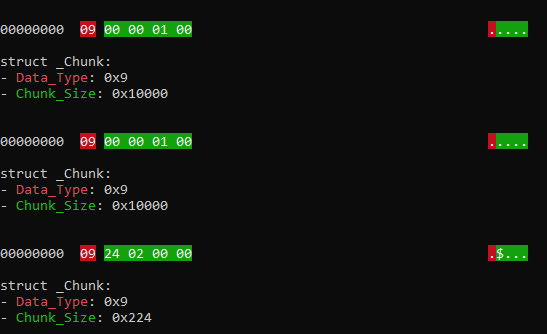
Quarantine Data

If the Quarantine SDDL is present, the Quarantine Data will come next, without the unknown data prepended to it. The Quarantine Data is broken into chunks of data XORed with A5 until there are no chunks left. If the unknown data was prepended to the Quarantine Data, the Attribute structure may follow.


Quarantine Attribute

The Quarantine Attribute structure holds any attributes associated with the data. I have come across $EA_INFORMATION, $OBJECT_ID, and $DATA stored in this structure so far.

$OBJECT_ID example


new 1

Record Type 2

Quarantine Metadata

Offset Length Field Description
0 8 QM Header Header is always 0000000000000000
8 8 QM Header Size Size, in bytes, of the QM header
16 8 QM Size Size, in bytes, of the QM
24 8 QM Size + Header Size Size, in bytes, of the QM and header
32 8 End of QM to End of VBN Size, in bytes, from end of QM to end of VBN
40 QM Size Quarntine Metadata Quarantine Metadata

The quarantine metadata appears to be in ASN.1 format. It is comprised of a series of tags.

ASN.1 Tags

Code Value Length Extra Data
0x01 1 None
0x0A 1 None
0x03 4 None
0x06 4 None
0x04 8 None
0x07 4 NUL-terminated ASCII String (of length controlled by dword following 0x07 code)
0x08 4 NUL-terminated Unicode String (of length controlled by dword following 0x08 code)
0x09 4 Container (of length controlled by dword following 0x09 code)
0x0F 16 None
0x10 16 None

The Tag determines what comes next.

0x03 Quarantine Hash

0x06 Unknown

Quarantine Hash

Offset Length Field Description
0 1 Tag1 0x03
1 4 Tag1 Value Tag1 Value
5 1 Tag2 Tag2
6 1 Tag2 Value Tag2 Value (value can be 0x00 or 0x01)
7 1 Tag3 (Optional) Tag3 (if Tag2 Value is 0x01, Tag3 is 0x08
8 4 SHA1 Hash Length (Optional) Length of SHA1 (if Tag3 is 0x08, data will be present)
12 SHA1 Hash Length SHA1 (Optional) SHA1 of quarantine data
94 1 Tag4 (Optional) Tag4, always 0x03
95 4 Tag4 Value (Optional) Tag4 Value
99 1 Tag5 (Optional) Tag5, always 0x03
100 4 Tag5 Value (Optional) Tag5 Value
104 1 Tag6 (Optional) Tag6, always 0x09
105 4 Quarantine Data Size Length (Optional) Length of quarantine data size
109 Quarantine Data Size Length Quarantine Data Size 2 (Optional) Size of quarantine data

Quarantine SDDL (Optional)

(may not be present)

Offset Lenght Field Description
0 1 Tag7 Tag7, always 0x08
1 4 Security Descriptor Size Variable length
5 Security Descriptor Size Security Descriptor Security descriptor of file
Varies 1 Tag8 Tag8
Varies 4 Tag8 Value Tag8 Value
Varies 1 Tag9 Tag9
Varies 8 Quarantine Data Size 3 Size of quarntine data

If the Quarantine SDDL tag is not present, there can be two additional structures included with the quarantine data.

Unknown (Optional)

If the Quarantine Data Size in VBN Metadata is Smaller than the Quarantine Data Size in Quarantine Info, this structure will be present.

Offset Lenght Field Description
0 1 Tag ASN.1 tag, 0x09
1 4 Chunk Size Variable length
5 8 Unknown Will require further investigation as to the purpose of this entry. (XORed with A5)
13 4 Unknown Data Size Size of unknown data (XORed with A5)
17 8 Unknown Will require further investigation as to the purpose of this entry. (XORed with A5)
25 Unknown Data Size Unknown Will require further investigation as to the purpose of this entry. (XORed with A5)
Varies 8 Unknown Will require further investigation as to the purpose of this entry. (XORed with A5)
Varies 4 Quarantine Data Size Size of quarantined data (XORed with A5)
Varies 8 Unknown Will require further investigation as to the purpose of this entry. (XORed with A5)
Varies Chunk Size Data Quarantine data (XORed with A5)

Quarantine Data (Optional)

The quarantine data is broken into chunks of data XORed with 0xA5. This continues until the last chunk divider.

Offset Lenght Field Description
0 1 Tag ASN.1 tag, 0x09
1 4 Chunk Size Variable length
5 Chunk Size Data Quarantine data (XORed with A5)

Attribute (Optional)

The followinf data is XORed with A5

Offset Lenght Field Description
Varies 8 Attribute Data Type (Optional) 0x02 = $EA, 0x04 = $DATA, 0x07 = $OBJECT_ID
Varies 8 Attribute Data Size (Optional) Size of attribute data
Varies 4 Attribute Name Size (Optional) Size of attribute name field
Varies Attribute Name Size Attribute Name (Optional) Name of attribute
Varies Attribute Data Size Attribute Data (Optional) Data, varies by type

The Unknown appears to be in ASN.1 format. It is comprised of a series of tags.

ASN.1 Tags

Code Value Length Extra Data
0x01 1 None
0x0A 1 None
0x03 4 None
0x06 4 None
0x04 8 None
0x07 4 NUL-terminated ASCII String (of length controlled by dword following 0x07 code)
0x08 4 NUL-terminated Unicode String (of length controlled by dword following 0x08 code)
0x09 4 Container (of length controlled by dword following 0x09 code)
0x0F 16 None
0x10 16 None

Tuesday, February 23, 2021

Your AV is Trying to Tell You Something: VBN's Part 1

Symantec VBN (quarantine) files have been rather troublesome for most people. I've read what articles I could find and looked at various tools on the subject but at some point, they all failed. There had to be something everyone was missing. And there was! As a community, we figured out that there were two types of VBN files. Depending on where they were in the folder structure determined whether they contained the quarantined file, or so we thought.

Shane King had shared his research into VBN's which laid the groundwork for the majority of my research. His methodology into extracting the quarantined content worked majority of the time, but not always. I was looking though Symantec's quarantine location one day and noticed some rather large VBN's in the location where they should only contain metadata and not quarantined content. When I XORed the data, I soon realized these larger files too contained quarantined content. A third VBN type!

Quarantine folder structure


Focusing back on the first structure in the VBN, they all looked the same. There had to be something in this structure that indicated what type of VBN we are dealing with. Back to Shane's work, there were a lot of unknowns in this structure. Looking through the unknown parts of the structure, I was able to figure out what the timestamps meant and various other things, but no indication on what would come next after this structure. It wasn't until I started playing around with Symantec's Qextract tool that I found my answer.

Qextract gives detailed output of the VBN files in the quarantine folder. By looking through this output, I was able to find the majority of the locations in the VBN file where Qextract was getting its information from. There was one part of the output that stood out to me, Record Type.  With this information, it confirmed my hypotheses that there were three different types of VBN. 


Now that we know there are different types of VBN's and a way to identify them, we can figure out what structures come next in the VBN file. I am going to stop here for now. I will cover the different structures of each record type in the next series of posts. In the mean time, below is the layout for the first structure. The VBN Metadata structure. *Note: This applies to VBN files found on Windows. Linux layout is still a work in progress.

test.md

VBN file format V1 (Windows - SEP 11)

VBN Metadata

Offset Length Field Description
0 4 Size Size of the VBN Metadata section, 0xe5c
4 384 Description FQP of Quarantine File
388 984 Log Line Information on event.
1372 4 Data Type Value which can describe the subsequent data. (0x1 = No dates, 0x2 = Dates)
1376 4 Record ID VBin ID/VBN Name
1380 8 Date Created Indicates a time of creation of object on the file system. (Windows Filetime)
1388 8 Date Accessed Indicates a time of last access of an object. (Windows Filetime)
1396 8 Date Modified Indicates a time of last modification of content. (Windows Filetime)
1404 4 Data Type Value which can describe the subsequent data. (0x0 = No storage info, 0x2 = Storage info)
1408 484 Unknown Will require further investigation as to the purpose of this entry.
1892 48 Storage Name Where threat was found (FileSystem/InternetMail/LotusNotes/MicrosoftExchange)
1940 4 Storage Instance ID Will require further investigation as to the purpose of this entry.
1944 384 Storage Key Will require further investigation as to the purpose of this entry.
2328 4 Data Type Value which can describe the subsequent data.
2332 4 Unknown Will require further investigation as to the purpose of this entry.
2336 8 Unknown Will require further investigation as to the purpose of this entry.
2344 4 Data Type Value which can describe the subsequent data.
2348 4 Quarantine Data Size Size of Quarantined Data (bytes)
2352 4 Date Accessed Indicates a time of last access of an object. (Unix: 32 bit Hex)
2356 4 Date Modified Indicates a time of last modification of content. (Unix: 32 bit Hex)
2360 4 Date Created Indicates a time of creation of object on the file system. (Unix: 32 bit Hex)
2364 4 VBin Time Time data was quarantined. (Unix: 32 bit Hex)
2368 8 Unknown Will require further investigation as to the purpose of this entry.
2376 16 Unique ID Unique GUID
2392 260 Unknown Will require further investigation as to the purpose of this entry.
2652 4 Unknown Will require further investigation as to the purpose of this entry.
2656 4 Record Type 0x0 = Hybrid, 0x1 = Meta, 0x2 = Quarantine
2660 4 Quarantine Session ID Name of subfolder where VBN is stored
2664 4 Remediation Type Type of remediation

0 None
2000 Registry
2001 File
2002 Process
2003 Batch File
2004 INI File
2005 Service
2006 Infected File
2007 COM Object
2008 Host File Entry
2009 Directory
2010 Layered Service Provider
2011 Internet Browser Cache
2668 4 Unknown Will require further investigation as to the purpose of this entry.
2672 4 Unknown Will require further investigation as to the purpose of this entry.
2676 4 Unknown Will require further investigation as to the purpose of this entry.
2680 4 Unknown Will require further investigation as to the purpose of this entry.
2684 4 Unknown Will require further investigation as to the purpose of this entry.
2688 4 Unknown Will require further investigation as to the purpose of this entry.
2692 4 Unknown Will require further investigation as to the purpose of this entry.
2696 768 Wide Description FQP of Quarantine File (Unicode)
3464 212 Unknown Will require further investigation as to the purpose of this entry.

VBN file format V2 (Windows - SEP 12 +)

VBN Metadata

Offset Length Field Description
0 4 Size Size of the VBN Metadata section, 0x1290
4 384 Description FQP of Quarantine File
388 2048 Log Line Information on event.
2436 4 Data Type Value which can describe the subsequent data. (0x1 = No dates, 0x2 = Dates)
2440 4 Record ID VBin ID/VBN Name
2444 8 Date Created Indicates a time of creation of object on the file system. (Windows Filetime)
2452 8 Date Accessed Indicates a time of last access of an object. (Windows Filetime)
2460 8 Date Modified Indicates a time of last modification of content. (Windows Filetime)
2468 4 Data Type Value which can describe the subsequent data. (0x0 = No storage info, 0x2 = Storage info)
2472 484 Unknown Will require further investigation as to the purpose of this entry.
2956 48 Storage Name Where threat was found (FileSystem/InternetMail/LotusNotes/MicrosoftExchange)
3004 4 Storage Instance ID Will require further investigation as to the purpose of this entry.
3008 384 Storage Key Will require further investigation as to the purpose of this entry.
3392 4 Data Type Value which can describe the subsequent data.
3396 4 Unknown Will require further investigation as to the purpose of this entry.
3400 8 Unknown Will require further investigation as to the purpose of this entry.
3408 4 Data Type Value which can describe the subsequent data.
3412 4 Quarantine Data Size Size of Quarantined Data (bytes)
3416 4 Date Accessed Indicates a time of last access of an object. (Unix: 32 bit Hex)
3420 4 Unknown Will require further investigation as to the purpose of this entry.
3424 4 Date Modified Indicates a time of last modification of content. (Unix: 32 bit Hex)
3428 4 Unknown Will require further investigation as to the purpose of this entry.
3432 4 Date Created Indicates a time of creation of object on the file system. (Unix: 32 bit Hex)
3436 4 Unknown Will require further investigation as to the purpose of this entry.
3440 4 VBin Time Time data was quarantined. (Unix: 32 bit Hex)
3444 4 Unknown Will require further investigation as to the purpose of this entry.
3448 4 Unknown Will require further investigation as to the purpose of this entry.
3452 16 Unique ID Unique GUID
3468 260 Unknown Will require further investigation as to the purpose of this entry.
3728 4 Unknown Will require further investigation as to the purpose of this entry.
3732 4 Record Type 0x0 = Hybrid, 0x1 = Meta, 0x2 = Quarantine
3736 4 Quarantine Session ID Name of subfolder where VBN is stored
3740 4 Remediation Type Type of remediation

0 None
2000 Registry
2001 File
2002 Process
2003 Batch File
2004 INI File
2005 Service
2006 Infected File
2007 COM Object
2008 Host File Entry
2009 Directory
2010 Layered Service Provider
2011 Internet Browser Cache
3744 4 Unknown Will require further investigation as to the purpose of this entry.
3748 4 Unknown Will require further investigation as to the purpose of this entry.
3752 4 Unknown Will require further investigation as to the purpose of this entry.
3756 4 Unknown Will require further investigation as to the purpose of this entry.
3760 4 Unknown Will require further investigation as to the purpose of this entry.
3764 4 Unknown Will require further investigation as to the purpose of this entry.
3768 4 Unknown Will require further investigation as to the purpose of this entry.
3772 768 Wide Description FQP of Quarantine File (Unicode)
4540 212 Unknown Will require further investigation as to the purpose of this entry.