Tuesday, March 2, 2021

Your AV is Trying to Tell You Something: VBN's Part 2

From the previous post, we learned that there are three VBN record types. I want to start with record type 2 because this is what people think of when examining VBN's. Record type 2 VBN's consist of the following structures:

  • VBN Metadata
  • Quarantine Metadata (XORed with 0x5A)
  • Quarantine Hash (XORED with 0x5A)
  • Quarantine SDDL (XORed with 0x5A) *Optional
  • Unknown (XORed with 0xA5) *Optional
  • Quarantine Data (XORed with 0xA5) *Optional
  • Quarantine Attribute (XORed with 0xA5) *Optional
These VBN's contain quarantine files/data except if the malicious data was cleaned by deletion. Type 2 are by far, the hardest to extract data from. If we grab the first four bytes (Quarantine Metadata Header offset) from the VBN Metadata, this will bring us to the beginning of the Quarantine Metadata Header.


Quarantine Metadata

The Quarantine Metadata starts out with a header that contains the size of the Quarantine Metadata and the size from the end of the Quarantine Metadata to the end of the VBN. 


The Quarantine Metadata itself, appears to be in ASN.1 format. A series of tags are used to differentiate the size and type of data. 


If we add together the Quarantine Metadata Header offset (from the VBN Metadata) and the QM Size Header Size together, we find ourselves at the next structure. What structure comes next depends on the tag. If it is 0x03, the Quarantine Hash structure is present. If it is 0x06, there is an unknown structure that appears to be a continuation of the Quarantine Metadata.

0x03 Quarantine Hash

The Quarantine Hash structure can contain the SHA1 hash and size of the quarantine data. This is all depends on the value of the second tag. If the value is 0x00, the hash will not be present and the VBN will end here. If it is 0x01, the hash and the rest of the fields will be present. If all fields are present in this structure, the next tag will either be 0x08 or 0x09. If the tag is 0x08, the Quarantine SDDL structure is present.

No hash data

Hash data

Quarantine SDDL

The Quarantine SDDL contains the security descriptor for the data that was quarantined and the size of  the quarantine data.


Unknown

If the Quarantine SDDL is not present, this structure will prepended the the quarantine data. I am unsure of what this structure represents at this time. The structure consists of a header, size of the unknown data, and the size of the data to follow.


Quarantine Data

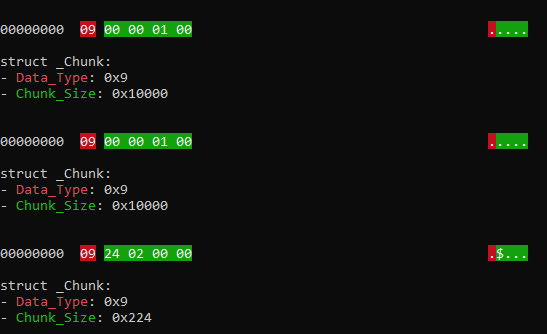
If the Quarantine SDDL is present, the Quarantine Data will come next, without the unknown data prepended to it. The Quarantine Data is broken into chunks of data XORed with A5 until there are no chunks left. If the unknown data was prepended to the Quarantine Data, the Attribute structure may follow.


Quarantine Attribute

The Quarantine Attribute structure holds any attributes associated with the data. I have come across $EA_INFORMATION, $OBJECT_ID, and $DATA stored in this structure so far.

$OBJECT_ID example


new 1

Record Type 2

Quarantine Metadata

Offset Length Field Description
0 8 QM Header Header is always 0000000000000000
8 8 QM Header Size Size, in bytes, of the QM header
16 8 QM Size Size, in bytes, of the QM
24 8 QM Size + Header Size Size, in bytes, of the QM and header
32 8 End of QM to End of VBN Size, in bytes, from end of QM to end of VBN
40 QM Size Quarntine Metadata Quarantine Metadata

The quarantine metadata appears to be in ASN.1 format. It is comprised of a series of tags.

ASN.1 Tags

Code Value Length Extra Data
0x01 1 None
0x0A 1 None
0x03 4 None
0x06 4 None
0x04 8 None
0x07 4 NUL-terminated ASCII String (of length controlled by dword following 0x07 code)
0x08 4 NUL-terminated Unicode String (of length controlled by dword following 0x08 code)
0x09 4 Container (of length controlled by dword following 0x09 code)
0x0F 16 None
0x10 16 None

The Tag determines what comes next.

0x03 Quarantine Hash

0x06 Unknown

Quarantine Hash

Offset Length Field Description
0 1 Tag1 0x03
1 4 Tag1 Value Tag1 Value
5 1 Tag2 Tag2
6 1 Tag2 Value Tag2 Value (value can be 0x00 or 0x01)
7 1 Tag3 (Optional) Tag3 (if Tag2 Value is 0x01, Tag3 is 0x08
8 4 SHA1 Hash Length (Optional) Length of SHA1 (if Tag3 is 0x08, data will be present)
12 SHA1 Hash Length SHA1 (Optional) SHA1 of quarantine data
94 1 Tag4 (Optional) Tag4, always 0x03
95 4 Tag4 Value (Optional) Tag4 Value
99 1 Tag5 (Optional) Tag5, always 0x03
100 4 Tag5 Value (Optional) Tag5 Value
104 1 Tag6 (Optional) Tag6, always 0x09
105 4 Quarantine Data Size Length (Optional) Length of quarantine data size
109 Quarantine Data Size Length Quarantine Data Size 2 (Optional) Size of quarantine data

Quarantine SDDL (Optional)

(may not be present)

Offset Lenght Field Description
0 1 Tag7 Tag7, always 0x08
1 4 Security Descriptor Size Variable length
5 Security Descriptor Size Security Descriptor Security descriptor of file
Varies 1 Tag8 Tag8
Varies 4 Tag8 Value Tag8 Value
Varies 1 Tag9 Tag9
Varies 8 Quarantine Data Size 3 Size of quarntine data

If the Quarantine SDDL tag is not present, there can be two additional structures included with the quarantine data.

Unknown (Optional)

If the Quarantine Data Size in VBN Metadata is Smaller than the Quarantine Data Size in Quarantine Info, this structure will be present.

Offset Lenght Field Description
0 1 Tag ASN.1 tag, 0x09
1 4 Chunk Size Variable length
5 8 Unknown Will require further investigation as to the purpose of this entry. (XORed with A5)
13 4 Unknown Data Size Size of unknown data (XORed with A5)
17 8 Unknown Will require further investigation as to the purpose of this entry. (XORed with A5)
25 Unknown Data Size Unknown Will require further investigation as to the purpose of this entry. (XORed with A5)
Varies 8 Unknown Will require further investigation as to the purpose of this entry. (XORed with A5)
Varies 4 Quarantine Data Size Size of quarantined data (XORed with A5)
Varies 8 Unknown Will require further investigation as to the purpose of this entry. (XORed with A5)
Varies Chunk Size Data Quarantine data (XORed with A5)

Quarantine Data (Optional)

The quarantine data is broken into chunks of data XORed with 0xA5. This continues until the last chunk divider.

Offset Lenght Field Description
0 1 Tag ASN.1 tag, 0x09
1 4 Chunk Size Variable length
5 Chunk Size Data Quarantine data (XORed with A5)

Attribute (Optional)

The followinf data is XORed with A5

Offset Lenght Field Description
Varies 8 Attribute Data Type (Optional) 0x02 = $EA, 0x04 = $DATA, 0x07 = $OBJECT_ID
Varies 8 Attribute Data Size (Optional) Size of attribute data
Varies 4 Attribute Name Size (Optional) Size of attribute name field
Varies Attribute Name Size Attribute Name (Optional) Name of attribute
Varies Attribute Data Size Attribute Data (Optional) Data, varies by type

The Unknown appears to be in ASN.1 format. It is comprised of a series of tags.

ASN.1 Tags

Code Value Length Extra Data
0x01 1 None
0x0A 1 None
0x03 4 None
0x06 4 None
0x04 8 None
0x07 4 NUL-terminated ASCII String (of length controlled by dword following 0x07 code)
0x08 4 NUL-terminated Unicode String (of length controlled by dword following 0x08 code)
0x09 4 Container (of length controlled by dword following 0x09 code)
0x0F 16 None
0x10 16 None

Tuesday, February 23, 2021

Your AV is Trying to Tell You Something: VBN's Part 1

Symantec VBN (quarantine) files have been rather troublesome for most people. I've read what articles I could find and looked at various tools on the subject but at some point, they all failed. There had to be something everyone was missing. And there was! As a community, we figured out that there were two types of VBN files. Depending on where they were in the folder structure determined whether they contained the quarantined file, or so we thought.

Shane King had shared his research into VBN's which laid the groundwork for the majority of my research. His methodology into extracting the quarantined content worked majority of the time, but not always. I was looking though Symantec's quarantine location one day and noticed some rather large VBN's in the location where they should only contain metadata and not quarantined content. When I XORed the data, I soon realized these larger files too contained quarantined content. A third VBN type!

Quarantine folder structure


Focusing back on the first structure in the VBN, they all looked the same. There had to be something in this structure that indicated what type of VBN we are dealing with. Back to Shane's work, there were a lot of unknowns in this structure. Looking through the unknown parts of the structure, I was able to figure out what the timestamps meant and various other things, but no indication on what would come next after this structure. It wasn't until I started playing around with Symantec's Qextract tool that I found my answer.

Qextract gives detailed output of the VBN files in the quarantine folder. By looking through this output, I was able to find the majority of the locations in the VBN file where Qextract was getting its information from. There was one part of the output that stood out to me, Record Type.  With this information, it confirmed my hypotheses that there were three different types of VBN. 


Now that we know there are different types of VBN's and a way to identify them, we can figure out what structures come next in the VBN file. I am going to stop here for now. I will cover the different structures of each record type in the next series of posts. In the mean time, below is the layout for the first structure. The VBN Metadata structure. *Note: This applies to VBN files found on Windows. Linux layout is still a work in progress.

test.md

VBN file format V1 (Windows - SEP 11)

VBN Metadata

Offset Length Field Description
0 4 Size Size of the VBN Metadata section, 0xe5c
4 384 Description FQP of Quarantine File
388 984 Log Line Information on event.
1372 4 Data Type Value which can describe the subsequent data. (0x1 = No dates, 0x2 = Dates)
1376 4 Record ID VBin ID/VBN Name
1380 8 Date Created Indicates a time of creation of object on the file system. (Windows Filetime)
1388 8 Date Accessed Indicates a time of last access of an object. (Windows Filetime)
1396 8 Date Modified Indicates a time of last modification of content. (Windows Filetime)
1404 4 Data Type Value which can describe the subsequent data. (0x0 = No storage info, 0x2 = Storage info)
1408 484 Unknown Will require further investigation as to the purpose of this entry.
1892 48 Storage Name Where threat was found (FileSystem/InternetMail/LotusNotes/MicrosoftExchange)
1940 4 Storage Instance ID Will require further investigation as to the purpose of this entry.
1944 384 Storage Key Will require further investigation as to the purpose of this entry.
2328 4 Data Type Value which can describe the subsequent data.
2332 4 Unknown Will require further investigation as to the purpose of this entry.
2336 8 Unknown Will require further investigation as to the purpose of this entry.
2344 4 Data Type Value which can describe the subsequent data.
2348 4 Quarantine Data Size Size of Quarantined Data (bytes)
2352 4 Date Accessed Indicates a time of last access of an object. (Unix: 32 bit Hex)
2356 4 Date Modified Indicates a time of last modification of content. (Unix: 32 bit Hex)
2360 4 Date Created Indicates a time of creation of object on the file system. (Unix: 32 bit Hex)
2364 4 VBin Time Time data was quarantined. (Unix: 32 bit Hex)
2368 8 Unknown Will require further investigation as to the purpose of this entry.
2376 16 Unique ID Unique GUID
2392 260 Unknown Will require further investigation as to the purpose of this entry.
2652 4 Unknown Will require further investigation as to the purpose of this entry.
2656 4 Record Type 0x0 = Hybrid, 0x1 = Meta, 0x2 = Quarantine
2660 4 Quarantine Session ID Name of subfolder where VBN is stored
2664 4 Remediation Type Type of remediation

0 None
2000 Registry
2001 File
2002 Process
2003 Batch File
2004 INI File
2005 Service
2006 Infected File
2007 COM Object
2008 Host File Entry
2009 Directory
2010 Layered Service Provider
2011 Internet Browser Cache
2668 4 Unknown Will require further investigation as to the purpose of this entry.
2672 4 Unknown Will require further investigation as to the purpose of this entry.
2676 4 Unknown Will require further investigation as to the purpose of this entry.
2680 4 Unknown Will require further investigation as to the purpose of this entry.
2684 4 Unknown Will require further investigation as to the purpose of this entry.
2688 4 Unknown Will require further investigation as to the purpose of this entry.
2692 4 Unknown Will require further investigation as to the purpose of this entry.
2696 768 Wide Description FQP of Quarantine File (Unicode)
3464 212 Unknown Will require further investigation as to the purpose of this entry.

VBN file format V2 (Windows - SEP 12 +)

VBN Metadata

Offset Length Field Description
0 4 Size Size of the VBN Metadata section, 0x1290
4 384 Description FQP of Quarantine File
388 2048 Log Line Information on event.
2436 4 Data Type Value which can describe the subsequent data. (0x1 = No dates, 0x2 = Dates)
2440 4 Record ID VBin ID/VBN Name
2444 8 Date Created Indicates a time of creation of object on the file system. (Windows Filetime)
2452 8 Date Accessed Indicates a time of last access of an object. (Windows Filetime)
2460 8 Date Modified Indicates a time of last modification of content. (Windows Filetime)
2468 4 Data Type Value which can describe the subsequent data. (0x0 = No storage info, 0x2 = Storage info)
2472 484 Unknown Will require further investigation as to the purpose of this entry.
2956 48 Storage Name Where threat was found (FileSystem/InternetMail/LotusNotes/MicrosoftExchange)
3004 4 Storage Instance ID Will require further investigation as to the purpose of this entry.
3008 384 Storage Key Will require further investigation as to the purpose of this entry.
3392 4 Data Type Value which can describe the subsequent data.
3396 4 Unknown Will require further investigation as to the purpose of this entry.
3400 8 Unknown Will require further investigation as to the purpose of this entry.
3408 4 Data Type Value which can describe the subsequent data.
3412 4 Quarantine Data Size Size of Quarantined Data (bytes)
3416 4 Date Accessed Indicates a time of last access of an object. (Unix: 32 bit Hex)
3420 4 Unknown Will require further investigation as to the purpose of this entry.
3424 4 Date Modified Indicates a time of last modification of content. (Unix: 32 bit Hex)
3428 4 Unknown Will require further investigation as to the purpose of this entry.
3432 4 Date Created Indicates a time of creation of object on the file system. (Unix: 32 bit Hex)
3436 4 Unknown Will require further investigation as to the purpose of this entry.
3440 4 VBin Time Time data was quarantined. (Unix: 32 bit Hex)
3444 4 Unknown Will require further investigation as to the purpose of this entry.
3448 4 Unknown Will require further investigation as to the purpose of this entry.
3452 16 Unique ID Unique GUID
3468 260 Unknown Will require further investigation as to the purpose of this entry.
3728 4 Unknown Will require further investigation as to the purpose of this entry.
3732 4 Record Type 0x0 = Hybrid, 0x1 = Meta, 0x2 = Quarantine
3736 4 Quarantine Session ID Name of subfolder where VBN is stored
3740 4 Remediation Type Type of remediation

0 None
2000 Registry
2001 File
2002 Process
2003 Batch File
2004 INI File
2005 Service
2006 Infected File
2007 COM Object
2008 Host File Entry
2009 Directory
2010 Layered Service Provider
2011 Internet Browser Cache
3744 4 Unknown Will require further investigation as to the purpose of this entry.
3748 4 Unknown Will require further investigation as to the purpose of this entry.
3752 4 Unknown Will require further investigation as to the purpose of this entry.
3756 4 Unknown Will require further investigation as to the purpose of this entry.
3760 4 Unknown Will require further investigation as to the purpose of this entry.
3764 4 Unknown Will require further investigation as to the purpose of this entry.
3768 4 Unknown Will require further investigation as to the purpose of this entry.
3772 768 Wide Description FQP of Quarantine File (Unicode)
4540 212 Unknown Will require further investigation as to the purpose of this entry.

Tuesday, February 16, 2021

Your AV is Trying to Tell You Something: AVMan.log/Daily AV Log

AVMan_Format.md

AV Managment Plugin Log

The AV Managment Plugin log contains copies of all AV events that occured on the endpint. AVMan's entries consist of data, in the form of the log line format, with some additional timestamps.

Antivirus Management Log File Format

The antivirus managment log for SEP can be found at the following location:
C:\ProgramData\Symantec\Symantec Endpoint Protection\CurrentVersion\Data\Logs\AVMan.log

Field Type Size Description
Max Log Size hex 8 Maximum log file size in bytes
Unknown hex 8 ?
Number of Entries hex 8 Number of entries in log
Unknown hex 8 ?
Unknown hex 8 ?
Max Log Days hex 8 Maximun days to save log entries

Log Entries

The log is in TSV format, meaning, each field is separated by a tab character.

Field Type Size Description
Entry Length hex 8 Length of log entry
Date and Time 1 Windows: 64 bit Hex Value - Big Endian 16 Will require further investigation as to the purpose of this log entry.
Date and Time 2 Windows: 64 bit Hex Value - Big Endian 16 Will require further investigation as to the purpose of this log entry.
Date and Time 3 Windows: 64 bit Hex Value - Big Endian 16 Will require further investigation as to the purpose of this log entry.
Unknown hex 8 Will require further investigation as to the purpose of this log entry.
Data varbinary 2000 Additional data in binary format.

Daily AV Log

The daily AV log also contains copies of AV events tha occured on the endpoint. These logs are broken down by day and consist of log line entries and do not contain a header. The daily AV logs stored in the users appdata folder go back to when Symantec was first installed and pertain only to that user. The ones in the programdata folder contain all users AV events but only go back thirty days or what the Symantec policy dictates.

The daily AV logss for SEP can be found in the following loactions:
C:\ProgramData\Symantec\Symantec Endpoint Protection\CurrentVersion\Data\Logs\AV
C:\Users\<user>\AppData\Local\Symantec\Symantec Endpoint Protection\Logs

Tuesday, February 9, 2021

Your AV is Trying to Tell You Something: process.log

processlog_Format.md

Client Management Control Log

The process log contains client activities that occured on the endpoint. The types of events the process log reports on are application control driver, application control rules, or tamper protect. There is little difference from the actual log and the Windows client. The process log is one of the more human readable logs.

Control Log File Format

The control log for SEP can be found at the following location: C:\ProgramData\Symantec\Symantec Endpoint Protection\CurrentVersion\Data\Logs\processlog.log

Field Type Size Description
Log Type hex 8 Always 00000004
Max Log Size hex 8 Maximum log file size in bytes
Unknown hex 8 ?
Number of Entries hex 8 Number of entries in log
Unknown hex 8 ?
Running Total Entries hex 16 Total number of events generated
Max Log Days hex 8 Maximun days to save log entries

Log Entries

The log is in TSV format, meaning, each field is separated by a tab character.

Field Type Size Description
Entry Length hex 3 Length of log entry
Date and Time Windows: 64 bit Hex Value - Big Endian 16 The time of the generated event (GMT).
Event ID hex 3 An event ID from the sending agent:
501 = Application Control Driver
502 = Application Control Rules
999 = Tamper Protection
Severity int 1 The seriousness of the event
0 is most serious.
Action int 1 The action that was taken:
0 = allow
1 = block
2 = ask
3 = continue
4 = terminate
Test Mode int 1 Was this rule run in test mode?
0 = No, Else = Yes
Description nvarchar 8000 The behavior that was blocked.

Because of a character limit, actual values may be longer than the values that
are displayed in Symantec Endpoint Protection Manager. You can verify the full text on the client that reports this data.
API nvarchar 512 The API that was blocked.
Unknown hex 16 Will require further investigation as to the purpose of this log entry.
Begin Time Windows: 64 bit Hex Value - Big Endian 16 The start time of the security issue.
End Time Windows: 64 bit Hex Value - Big Endian 16 The end time of the security issue. This field is an optional field because the
exact end time of traffic may not be detected; for example, as with UDP traffic.
If the end time is not detected, it is set to equal the start time.
Rule Name nvarchar 512 The name of the rule that was triggered by the event. If the rule name is not
specified in the security rule, then this field is empty. Having the rule name can
be useful for troubleshooting.
Caller Process ID hex 4 The ID of the process that triggers the logging.
Caller Process nvarchar 512 The full path name of the application involved. It may be empty if the
application is unknown, or if OS itself is involved, or if no application is involved.
Also, it may be empty if profile says, "don't log application name in raw traffic log".
Unknown int 1 Will require further investigation as to the purpose of this log entry.
Caller Return Module Name nvarchar 512 The module name of the caller. See CallerReturnAddress for more information.
Target nvarchar ? Name of file
Location nvarchar 512 The location used when the event occured.
User nvarchar 512 The logon user name.
User Domain nvarchar 512 The logon (Windows) domain name.
Unknown int 1 Will require further investigation as to the purpose of this log entry.
IPV4 Address hex 8 The IP address of the computer associated with the application control violation.
Device Instance ID varchar 256 The GUID of an external device (floppy disk, DVD, USB device, etc.).
File Size hex 2 The size of the file associated with the application control violation, in bytes.
Unknown hex 8 Will require further investigation as to the purpose of this log entry.
IPV6 Address hex 32 The IP address of the computer associated with the application control violation. (IPV6)

Tuesday, February 2, 2021

Your AV is Trying to Tell You Something: rawlog.log

rawlog_Format.md

Network and Host Exploit Mitigation Packet Log

The raw log contains packet traffic that occured on the endpoint. This log is populated if the firewall rule is set to capture a packet. The only thing the Windows client is missing is the rule id. This log is not very human readable due to the packet data it contains. One shortcoming to the smc commandline tool is that it will not export the packet data even though it is in the log and the Windows GUI client.

Packet Log File Format

The packet log for SEP can be found at the following location: C:\ProgramData\Symantec\Symantec Endpoint Protection\CurrentVersion\Data\Logs\rawlog.log

Field Type Size Description
Log Type hex 8 Always 00000003
Max Log Size hex 8 Maximum log file size in bytes
Unknown hex 8 ?
Number of Entries hex 8 Number of entries in log
Unknown hex 8 ?
Running Total Entries hex 16 Total number of events generated
Max Log Days hex 8 Maximun days to save log entries

Log Entries

The log is in TSV format, meaning, each field is separated by a tab character.

Field Type Size Description
Entry Length hex 8 Length of log entry
Date and Time Windows: 64 bit Hex Value - Big Endian 16 The time of the generated event (GMT).
Event ID hex 8 An event ID from the sending agent:
401 = Raw Ethernet
Local Host hex 8 The IP address of the local computer (IPv4).
Remote Host hex 8 The IP address of the remote computer (IPv4).
Local Port hex 8 The TCP/UDP port of the local computer (host byte-order). It is only valid on
TSE_TRAFFIC_TCP and TSE_TRAFFIC_UDP. For other events, it is always zero.
Remote Port hex 8 The TCP/UDP port of the remote computer (host byte-order). It is only valid on
TSE_TRAFFIC_TCP and TSE_TRAFFIC_UDP. For other events, it is always zero.
Packet Length hex 8 Lenght of packet data
Direction hex 8 The direction of traffic (unknown = 0; inbound = 1; outbound = 2).
Action hex 8 Specifies if the traffic was blocked (yes = 1, no = 0).
Unknown hex 8 Will require further investigation as to the purpose of this log entry.
Remote Host Name nvarchar 128 The host name of the remote computer. This field may be empty if the name resolution failed.
Application nvarchar 512 The full path name of the application involved. It may be empty if an unknown
application is involved or if no application is involved. For example, the ping of
death DoS attack does not have an AppName because it attacks the operating
system.
Packet varbinary 2000
Rule nvarchar 512 The name of the rule that was triggered by the event. If the rule name is not
specified in the security rule, then this field is empty. Having the rule name can
be useful for troubleshooting. You may recognize a rule by the rule ID, but rule
name can help you recognize it more quickly.
Unknown hex 8 Will require further investigation as to the purpose of this log entry.
Remote Host IPV6 hex 32 The IP address of the remote host (IPv6).
Local Host IPV6 hex 32 The IP address of the local computer (IPv6).
Rule ID cahr 32 The ID of the rule that is triggered by the event. It is always 0 if the rule ID is not
specified in the security rule. This field is helpful to security rule troubleshooting.
If multiple rules match, it logs the rule that has the final decision on PacketProc
(pass/block/drop).